Troubleshooting & FAQ
Find answers to common questions, connection troubleshooting steps, and license management guides.
Frequently Asked Questions
Is there a latency difference between copying in NinjaTrader and Quantower?
TradeBridge uses local Windows Named Pipes for communication on both sides. Local dispatch is fast, but total copy delay, broker response, and fill timing depend on NinjaTrader, Quantower, the broker gateway, market conditions, and your local PC.
Can I copy trades from Quantower to NinjaTrader 8?
Yes. TradeBridge supports multi-platform broadcast copying: NT8 to NT8, NT8 to QT, QT to QT, and QT to NT8. You can select any account as your leader and copy to enabled NinjaTrader 8 and Quantower follower accounts, subject to your platform and broker connection limits.
What is the Rithmic connection limit in NinjaTrader 8?
NinjaTrader 8 only allows one active Rithmic connection at a time. If you connect to multiple Rithmic accounts in NT8, they will fail to load or disconnect. To work around this, you can connect eligible follower accounts in Quantower where your Quantower license, broker, and feed provider support the required simultaneous sessions, then run NinjaTrader 8 as your leader. TradeBridge bridges the orders locally.
Does TradeBridge support CQG inside NinjaTrader 8?
No. NinjaTrader 8 does not support direct CQG connections anymore. If your broker uses CQG, you should connect to it inside Quantower. TradeBridge will copy orders to/from it via the Quantower strategy plugin.
Troubleshooting Connection Issues
TradeBridge shows "Disconnected" for NinjaTrader 8
If the Control Center does not detect NinjaTrader 8, check the following:
- Verify that NinjaTrader 8 is running.
- Ensure that you ran the TradeBridge installer and imported the staged NinjaTrader package via Tools → Import → NinjaScript Add-On.
- Verify that you restarted NinjaTrader 8 after the Add-On import completed.
- Check if your Windows Firewall or security software is blocking local port communications (TradeBridge uses local Windows Named Pipes for local inter-process communication).
Quantower TradeBridge does not show up in Quantower
If the TradeBridge copier does not connect or show up in Quantower:
- Ensure that you ran the TradeBridge installer, which automatically places the receiver DLL inside Quantower's strategies directory.
- Verify that you restarted Quantower.
- Open the Strategies panel in Quantower and check if the Quantower Trade Bridge Receiver strategy is running. It must be started to listen for incoming copy events.
Support Diagnostic Bundles
If you encounter any issues or discrepancies during copying, you don't need to manually hunt down config files and text logs in multiple system directories.
Clicking the Support Bundle button in the Control Center collects the most useful local diagnostics into a ZIP:
- All platform copier logs (Control Center WinUI logs, NT8 copier log, Quantower receiver log).
- Live status files and configuration files (redacting license keys for security).
- Diagnostic metadata such as app version, runtime paths, platform status, and system time when available.
This information is packaged into a single ZIP file under your active TradeBridge runtime folder:
[TradeBridge Home]\support\tradebridge-support-YYYYMMDD-HHMMSS.zip
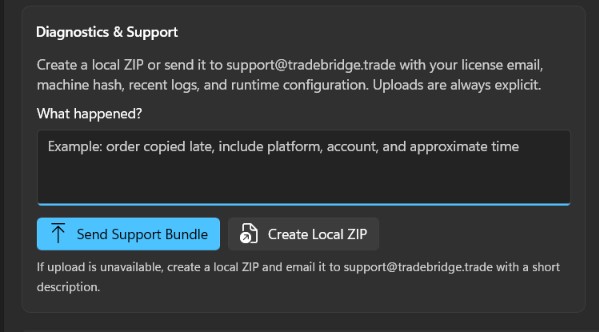
Simply drag and drop this zip file into your support ticket or attach it to your email to the TradeBridge team.
Diagnostic Logs Location
If you encounter an issue, please locate the diagnostic logs under your active TradeBridge Home folder, for example E:\Programs\TradeBridge\logs\ or %USERPROFILE%\Documents\TradeBridge\logs\ depending on your installation:
- Control Center GUI Log:
logs\control-center-winui.log - Control Center Crash Log:
logs\control-center-crash.log - NinjaTrader 8 Copier Log:
logs\nt8-account-copier.log - Quantower Copier Log:
logs\quantower-receiver.log