Installation & Setup
This guide explains how to install TradeBridge and establish connections between your trading platforms. The TradeBridge installer installs the Control Center, prepares the local runtime folder, installs Quantower strategy files, and stages the NinjaTrader 8 Add-On package for import.
System Requirements
- Windows 10 or Windows 11 (64-bit).
- NinjaTrader 8 (v8.0.27.0 or newer).
- Quantower (v1.142 or newer).
- No .NET SDK or build tools are required for the normal customer installer.
1. Run the Installer
Download and run the TradeBridge installer (.exe) from the User Portal. The installer prepares the local application files and platform packages:
- Creates your local TradeBridge Home directory.
- Configures the necessary system environment variables.
- Stages the NinjaTrader 8 NinjaScript Add-On package for manual import.
- Installs the Quantower receiver strategy files into your Quantower scripts folder.
2. NinjaTrader 8 Setup
TradeBridge runs globally in the background as a NinjaTrader Add-On, so no NinjaTrader chart indicator or chart strategy needs to be loaded on active charts. Quantower uses the separate TradeBridge receiver strategy described below.
To finalize the NinjaTrader integration after running the installer, import the staged Add-On package:
- Open NinjaTrader 8.
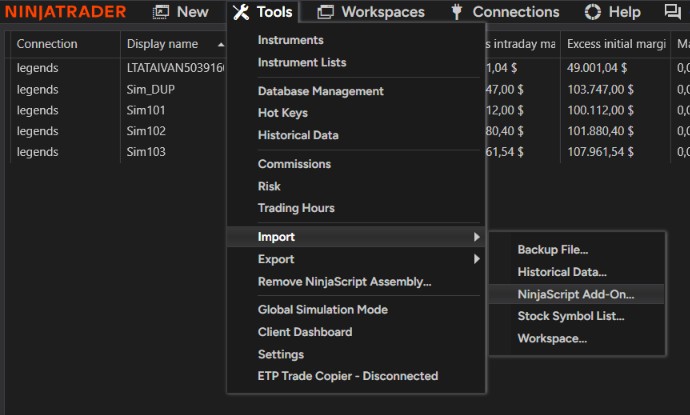
- Navigate to Tools → Import → NinjaScript Add-On.
- Select the staged TradeBridge NT8 package from your TradeBridge install folder, usually under
platform-packages\ninjatrader. - Accept NinjaTrader's import prompts and wait for the import to finish.
- Restart NinjaTrader 8. The Add-On is now active in the background.
Developer builds only: Raw .cs source-copy installation and NinjaScript Editor compilation are development workflows. Commercial/customer installs should use the exported NinjaScript Add-On package.
Rithmic Connection Limitation: NinjaTrader 8 supports only one active Rithmic connection concurrently. If you connect to multiple Rithmic accounts in NT8, they will fail to load or disconnect. To copy to multiple Rithmic accounts, connect those follower accounts in Quantower instead.
3. Quantower Setup
The plugin is installed automatically into your Quantower strategy files. To activate it:
- Open Quantower.
- Open the Strategies panel from the main menu.
- Locate the Quantower Trade Bridge Receiver strategy in the list.
- Click Start to run the strategy. The local Named Pipe listener will turn on and begin listening for copier messages.

Quantower Multi-Connect: Multi-account availability depends on your Quantower license, broker sponsorship, and data connection. If you need multiple simultaneous broker connections, confirm that your Quantower plan supports it before trading live.
4. Verify Local Connection
Start the TradeBridge Control Center desktop app. The dashboard will show NinjaTrader 8 and Quantower as connected once the platform components establish local named pipe connections on your computer.