Getting Started
Welcome to TradeBridge. This documentation will guide you through installing, configuring, and operating our high-performance local trade copier for NinjaTrader 8 and Quantower.
Note: TradeBridge runs entirely on your local machine using fast Windows Named Pipes. The Control Center desktop application manages configuration and monitoring while the platform runtimes handle order copying locally. Platform and broker response times still depend on NinjaTrader, Quantower, your broker gateway, and your connection.
Quick Start Checklist (5 Minutes)
To get your copier up and running, follow these steps:
- Download & Install: Download the latest installer from the User Portal and run it. This installs the TradeBridge Control Center.
- Activate License or Start Trial: Open the TradeBridge Control Center, navigate to Help, and enter your license key to activate online. If you don't have a key, enter your email address in the trial box to start your one-time 14-day free trial on this PC.
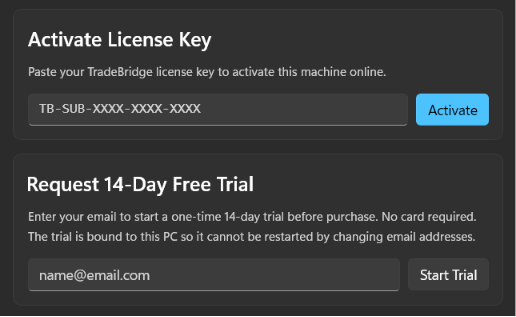
- Import Platform Components: Import the staged NinjaTrader 8 NinjaScript Add-On package and start the Quantower receiver strategy (see the Installation Guide).
- Select Leader: At the top of the Settings screen in the Control Center, select your Leader Platform (NT8 or Quantower) and your active Leader Account.
- Configure Followers: Enable the follower accounts in the account settings grid below and define your sizing multipliers.
External Charting & Execution Platforms
One of the greatest benefits of TradeBridge is that you do not have to place trades inside NinjaTrader 8 or Quantower to copy them.
If you use TradingView, Jigsaw daytradr, ATAS, Bookmap, MotiveWave, or even your broker's mobile app to execute trades, TradeBridge can copy those trades as long as the same execution account is connected and active in NinjaTrader 8 or Quantower on your local machine and the platform receives the account/order events from your broker.
Core Concepts
Understanding these terms will help you configure TradeBridge correctly:
| Term | Definition |
|---|---|
| Leader Account | The source account where trades are executed (either manually or from external platforms). TradeBridge monitors this account for fills. |
| Follower Account | The destination account that mirrors the Leader. Follower accounts are configured individually in the account grid. |
| Sizing Multiplier | The decimal lot multiplier used for followers (e.g. 1.0 copy same size, 2.0 double, 0.5 half size). |
| Simultaneous Broadcasting | The ability to copy from a single Leader to multiple follower accounts across NinjaTrader 8 and Quantower. Practical limits depend on platform licensing, broker/data connection rules, account count, and your local machine. |
| Local Named Pipes | The fast local channels used to pass trade messages directly between NinjaTrader and Quantower without cloud delays. |
Next Steps
Head to the Installation & Setup Guide to finalize integration with NinjaTrader 8 and Quantower.